
An ADHD budget planner is a budgeting tool built around how an ADHD brain actually works: a few simple categories, totals that update themselves, logging that takes seconds, and a pause before you spend.
The format matters far less than you'd think. A $0 notebook can work. A beautiful app can fail. What decides it is whether the planner does four jobs, and whether you'll actually open it.
Why normal budgets fall apart with ADHD
Here's the mechanism. When you buy something, the reward arrives instantly. The cost arrives later, invisibly, split into dozens of small amounts you've already forgotten. A $5 coffee doesn't feel like a decision. Twenty of them a month is a $100 decision you never actually made.
Most budgets fail because they're built to review spending at the end of the month, long after the moment that mattered.
A budget planner's real job is to make the cost visible at the moment you spend. That's the gap every good ADHD budget planner closes.
“I found this out the hard way. When I started logging everything, coffee and working from a shisha place turned out to be among the biggest lines in my month. I'd never have guessed. No willpower was involved in cutting back. Once I'd seen the number, I just didn't want to keep paying it.”
What a budget actually is: a worked example
A budget gives every bit of money a job before you spend it. You split your monthly income into categories, set a limit for each one, and take every expense off its category's limit. That's the whole thing, and once you understand it, you can run it on anything.
Here's what that looks like for someone taking home $2,500 a month (example figures only):
| Category | Type | Monthly budget |
|---|---|---|
| Rent | Essential | $1,100 |
| Groceries | Essential | $350 |
| Electricity and water | Essential | $150 |
| Transport | Essential | $120 |
| Phone and internet | Essential | $80 |
| Savings goal | Savings | $200 |
| Takeaways | Extra | $120 |
| Online shopping | Extra | $120 |
| Shisha / your weakness | Extra | $100 |
| Buffer for surprises | Extra | $100 |
| Coffee | Extra | $60 |
| Total | $2,500 |
Three things to notice:
- 1Essentials and savings come first. Extras get what's left, not the other way round.
- 2Your weakness gets its own line. Coffee isn't hidden in "miscellaneous". Once you can see it, you can manage it.
- 3The categories add up exactly to your income. Every dollar has a job, so nothing quietly leaks away.
Then the ledger does the work. Buy a $5 coffee and Coffee drops from $60 to $55 left. By week three you know exactly how many coffees you have left this month, before you're standing at the counter.
That also changes how the budget feels. It isn't a list of things you're banned from. It's permission. When coffee has $60 set aside, you can enjoy every cup without the background guilt, because it's already covered.
What makes a budget planner ADHD-friendly?
If budgets have never stuck for you, the problem probably wasn't you. It was a system built for a brain that finds repetitive admin easy. An ADHD-friendly budget planner works with how you actually operate:
🧠 Money struggles with ADHD are a systems problem, not a character flaw. Change the system and the behaviour gets easier.
Best budget planner for ADHD: options compared
The best ADHD budget planner is the one you'll actually open every day. Here's how the main formats compare.
| Format | ✅ Best for | ⚠️ Watch out for |
|---|---|---|
| ADHD Bright Notion planner (Finance Manager) | People who want category budgets that update as they log, a pause before spending, and finances in the same place as routines and planning | Needs Notion. The Finance Manager comes with the Complete tier (one-time payment) |
| Other Notion budget templates | Notion fans who enjoy customising | Quality and complexity vary a lot. Building your own setup can turn into a project that replaces the budgeting |
| Spreadsheet | People comfortable with formulas who want full control | All entry is manual, and it's easy to forget the file exists |
| Budgeting app | People who want phone reminders and quick entry on the go | Notifications can turn into background noise, and feature-heavy apps can overwhelm |
| Printable budget sheets | Visual thinkers who like paper but want structure | Easy to lose, and you do the maths by hand |
| Paper notebook | Anyone who wants to start today with zero setup | No automatic totals, and patterns are harder to see across months |
If you're stuck choosing, don't. Pick the one that fits the habits you already have, use it for a month, and switch only if it isn't working. Looking for a planner for more than money? See our comparison of the best ADHD planner for adults.
Digital vs printable vs paper: which format fits your brain?
Forget which format is "best" in general. Ask which one fits the way you already live:
For a deeper look at the trade-offs, see our guide to digital vs paper ADHD planners.
Features to look for before you buy or download
Whatever format you choose, check it has these:
- ✓Spending categories you can rename to fit your life
- ✓A budget per category that shows what's left
- ✓A quick expense log
- ✓Savings goals you can watch grow
- ✓Bill reminders or a place to list due dates
- ✓Debt tracking if you're paying anything off
- ✓Room for irregular income, if your pay changes month to month
- ✓A weekly check-in built into the routine
How to set up your ADHD budget planner in 15 minutes
This works in any format, notebook included. Set a timer, keep the steps small, and don't aim for perfect. A rough budget you use beats a perfect one you never finish.
- 1Write down the money you can count on each month⏱ 3 minUse what actually lands in your account after tax. If your income changes, use a typical low month, so the budget still works in a quiet one.
- 2List your essentials⏱ 3 minRent, electricity, water, phone, transport, groceries and any debt payments. These are the bills that have to be paid.
- 3Name your extras honestly⏱ 2 minCoffees, takeaways, shisha, games, online shopping. Whatever your weakness is, give it its own category. Hiding it in "miscellaneous" is how it gets away from you.
- 4Give every category a budget⏱ 4 minCover essentials first, then put something into savings, then share what's left between your extras. When you're done, your categories should add up to your monthly number.
- 5Set up your ledger⏱ 3 minFour columns: date, amount, category, what it was. Every expense comes off its category's budget. In a notebook you do that subtraction yourself. In a digital planner it happens for you.
That's your budget. Now comes the part that actually changes things.
Log everything, and watch your patterns appear
For the next few weeks, write down every single thing you spend money on. Not to judge yourself, just to see.
Very quickly, patterns start to show up. The little purchases you'd never think twice about, the ones that feel too small to matter, start adding up into numbers you can't ignore. For me it was coffees and working from a shisha place. I genuinely had no idea how much they added up to until I saw it written down. It was eye-opening.
And here's the part that matters. Once you've seen the real number, cutting back stops feeling like a sacrifice. You're not giving something up. You're just choosing not to keep paying for something that was never giving you what you thought. The decision makes itself.
If impulse spending is the main thing you're fighting, our guide on how to stop spending money with ADHD covers practical ways to add friction and avoid your trigger zones.
How the ADHD Bright Finance Manager does the maths for you
A reminder that this is our own planner, so read this section with that in mind. The Finance Manager inside the ADHD Bright Notion planner runs the same four-step system above, and takes the boring parts off your plate.
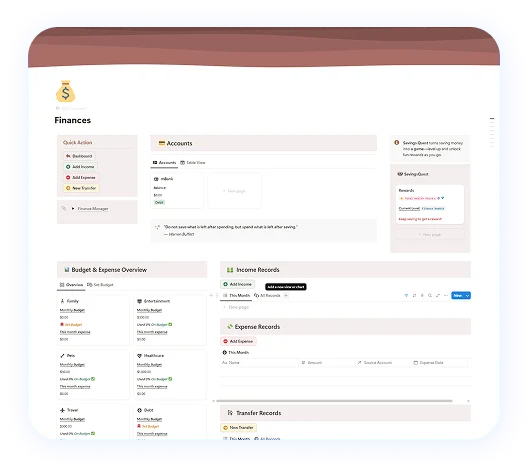
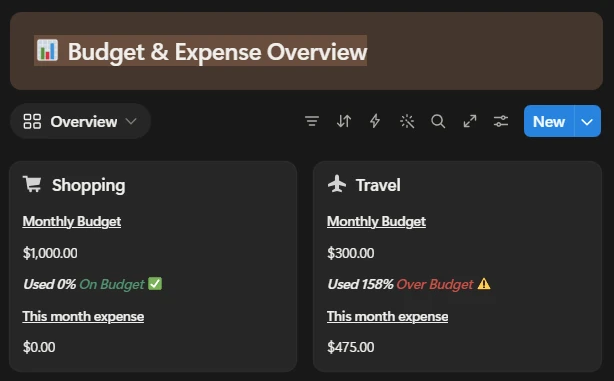

“This is the system I use myself. Seeing my categories update as I logged, and seeing coffee and shisha flagged Over Budget, is what finally made the patterns impossible to ignore. It helped me save far more than I expected.”
Who it's not for: if you don't use Notion and don't want to learn it, a notebook or a simple app will serve you better. The method matters more than the tool.
Make it stick: a simple weekly money reset
Once a week, give your budget ten minutes. Attach it to something you already do, like Sunday coffee or your ADHD weekly reset routine, so it doesn't rely on remembering.
- Log anything you missed. Estimates are fine.
- Check what's left in each category.
- Move money between categories if something ran over. That's the budget working, not failing.
- Put anything spare towards your savings goal.
- Ask yourself one question: what surprised me this week?
You'll miss weeks. Everyone does. When it happens, don't try to rebuild the whole month from receipts. Start again from today.
💪 A budget you restart ten times still beats one you abandoned once.
That's the idea behind consistency with ADHD: showing up imperfectly still counts. For more on habits that stick, see how to build ADHD routines.
Where a budget planner fits in a wider ADHD system
Money rarely gets out of hand on its own. It slides when everything else does too: missed bills when your week is chaos, takeaways when there's no meal plan, impulse buys when you're bored or overwhelmed. That's why a budget works best as one part of an all-in-one ADHD planner, alongside your routines, tasks and meals.
ADHD budget planner FAQs
What is the best budget planner for ADHD?
+
The best budget planner for ADHD is the one you'll actually use every day. Look for low setup effort, a few simple categories, totals that update for you, and something that makes you pause before spending. The format can be a Notion template, an app, a spreadsheet or a notebook.
Is there a budget planner designed for adults with ADHD?
+
Yes. Some planners are built around ADHD challenges like overwhelm and forgetting. The ADHD Bright Notion planner, which we make, includes a Finance Manager with category budgets, over-budget warnings, an Impulse Checker and a Savings Quest.
Should I use a digital or paper budget planner with ADHD?
+
Choose digital if you forget where things are or hate doing the maths. Choose paper if screens distract you or you want to start right now with no setup. Both work if you understand the basics of budgeting.
Why do I struggle to stick to a budget with ADHD?
+
Most budgets are built for brains that find repetitive admin easy. If yours needs lots of steps, many categories or perfect daily logging, it will slide. Simpler systems with quick logging and a weekly check-in are easier to keep going.
How often should I check my budget if I have ADHD?
+
Log spending as it happens, and do a short weekly check-in to review categories and adjust. Weekly is often enough to catch problems before the month is over.
Can I use Notion as an ADHD budget planner?
+
Yes. Notion works well as a budget planner if you already use it. A ready-made template saves you from building the setup yourself, which can easily become its own project.
Start with what you have
You don't need the perfect planner to take control of your money. You need to know your number, give it categories, set limits, and write down what you spend. Do that in a notebook tonight if you like.