
The best digital planner for ADHD adults isn’t necessarily the one with the longest feature list. It’s the one that fits naturally into your life, doesn’t create more work than it removes, and is easy to come back to when you inevitably stop using it for a day, a week, or sometimes longer.
But before comparing individual planners, there’s an important distinction that most “best digital planner for ADHD” lists miss: digital planners are not all the same thing.
There are three main types: planner apps, Notion-based planners, and tablet planners such as hyperlinked PDFs for iPad. They work completely differently, and the best option depends much more on how you naturally organize your life than on which planner has the most features. That distinction is also what current search results largely fail to explain.
I know this from experience. I have ADHD, and I’ve tried more planners, productivity apps, and organizational systems than I can count. Eventually, I stopped searching for the perfect one and built ADHD Bright around what I actually needed.
ADHD Bright is my own Notion-based planner, and it’s one of the planners included in this guide. I’m obviously not an impartial reviewer of my own product, so I’m not going to rank it #1 and pretend it’s right for everybody. It isn’t. I’ll tell you where I think it works particularly well and, just as importantly, when I think you should choose something else.
If you haven't decided whether you want digital at all, start with my guide to digital vs paper ADHD planners. This article assumes you've already decided you want something digital.
What Is an ADHD Digital Planner?
An ADHD digital planner is a planning system used on your phone, tablet, or computer that helps you externalize things you would otherwise have to remember and organize mentally, such as tasks, appointments, routines, projects, and priorities.
Depending on the type, it might also provide reminders, visual scheduling, habit tracking, time management tools, or a central place to store different parts of your life.
The important part is that “digital planner” doesn’t describe one product category. An app sending notifications to your phone and a handwritten PDF on an iPad are both digital planners, but using them feels completely different.
The 3 Types of Digital Planner for ADHD
Before comparing brands, pick your type.
| Type | Best for | Setup effort | Reminders | Works on | Typical cost model |
|---|---|---|---|---|---|
| 📱 Planner app | People who want active reminders and daily guidance | Low | Usually yes | Primarily phone, sometimes desktop/web | Subscription or freemium |
| 🧠 Notion planner | People who want an interconnected system for multiple areas of life | Low to medium | More limited | Phone, tablet, computer | Free or one-time template |
| ✍️ Tablet planner | People who love handwriting but want it digital | Low | Usually no | Primarily tablet | Usually one-time purchase |
1. Planner apps: great for reminders, potentially terrible for distraction
An ADHD digital planner app can be a great choice if you live on your phone and need your planner to actively get your attention. You can have your schedule with you everywhere, receive reminders, and quickly check what’s coming next.
But this is also exactly why planner apps don’t work particularly well for me.
My phone is already one of my biggest sources of distraction.
I can pick it up because I need to add one task to my planner. Then I notice a notification. I check it. Something there makes me think of something else, so I Google it. Somehow social media gets involved.
Forty minutes later, I’m still holding my phone and I haven’t added the task.
Sometimes I genuinely don’t know how I got from A to B. There wasn’t a conscious decision to spend 40 minutes scrolling. My attention just moved from one thing to another and I followed it.
I call this ADHD autopilot, and I’ve written an entire article about ADHD autopilot and why you can end up doing things without consciously realizing it. For me, putting my primary planning system inside the same device where this happens creates unnecessary friction. My planner is supposed to bring my attention back, not give it another opportunity to disappear.
That doesn’t mean planner apps are bad for ADHD. Quite the opposite. If you already manage your life effectively from your phone and external reminders are what you need, an app may be the best choice here.
But ask yourself one very practical question:
🎯 What normally happens when I unlock my phone?
2. Notion planners: powerful, but the design matters
A Notion planner works completely differently.
Instead of primarily telling you what happens at 2:30 p.m., Notion can become a much larger organizational system. Tasks can connect to projects. Your daily planning can connect to longer-term goals. Notes, habits, routines, finances, and other areas of your life can all live in the same workspace.
That sounds perfect for ADHD.
Except using Notion doesn't automatically make a planner ADHD-friendly.
Before building ADHD Bright, I tried a lot of ADHD Notion planners too. Some simply didn’t make logical sense to me. Others had so much going on that figuring out where to look or what to do next created more frustration than the planner was supposed to remove.
Sometimes something as simple as adding a task involved too much friction.
💡 The lessonThe platform wasn't the solution. The design of the system mattered much more.
A Notion planner can be beautifully designed and have 50 different features, but if you need to stop and think about where a task belongs every time you want to capture something, the planner itself is adding cognitive work.
And Notion has another potential trap: customization.
You can change almost everything, which doesn’t mean you should. It’s very easy to spend hours building the perfect productivity system instead of doing the thing you originally opened Notion to do.
3. Tablet planners: digital without giving up handwriting
Tablet planners are a completely different experience again.
These are usually hyperlinked PDFs opened in an app such as Goodnotes and used with a stylus. Think of them as paper planners without the actual paper.
I understand the appeal because I genuinely like handwriting. There’s something satisfying about physically writing a plan instead of entering information into another database.
Tablet planners can also remove one of my biggest problems with phone apps: you aren’t necessarily sitting inside the same stream of notifications, messages, and social media every time you want to plan.
But they retain many of the limitations of paper. You’re generally entering and moving information manually. They don’t behave like databases, and they don’t automatically connect different areas of your life in the way a Notion system can.
What to Look for in a Digital Planner for ADHD
Don’t start by comparing 40 features.
Start by looking at the friction between having a thought and getting it into your system.
- Can you capture something quickly?
- Can you immediately see what matters today?
- Does the planner work on the devices you actually use?
- Can you change plans without rebuilding your entire week?
And, crucially:
What happens when you don’t open it for five days?
That last question has become one of my biggest criteria.
I’ve abandoned plenty of planners because catching up became a task in itself. Once I was behind, opening the planner meant confronting everything I hadn’t done. Eventually, avoiding the planner was easier than fixing it.
Your planner needs to survive your bad weeks, not just look impressive during your motivated ones.
There’s also no point choosing a planner based on what you think you should enjoy using. If you hate writing by hand, buying a beautiful iPad planner won't suddenly turn you into someone who loves handwriting. If your phone constantly distracts you, putting your entire productivity system on your phone deserves some thought.
I go much deeper into those questions in How to Choose the Best Planner for ADHD.
Best Digital Planners for ADHD Adults: My Picks
Now we can actually compare planners.
Rather than pretending every product below is competing for the same job, I’ve separated them according to what they’re actually designed to do.
📱 Best ADHD Planner Apps
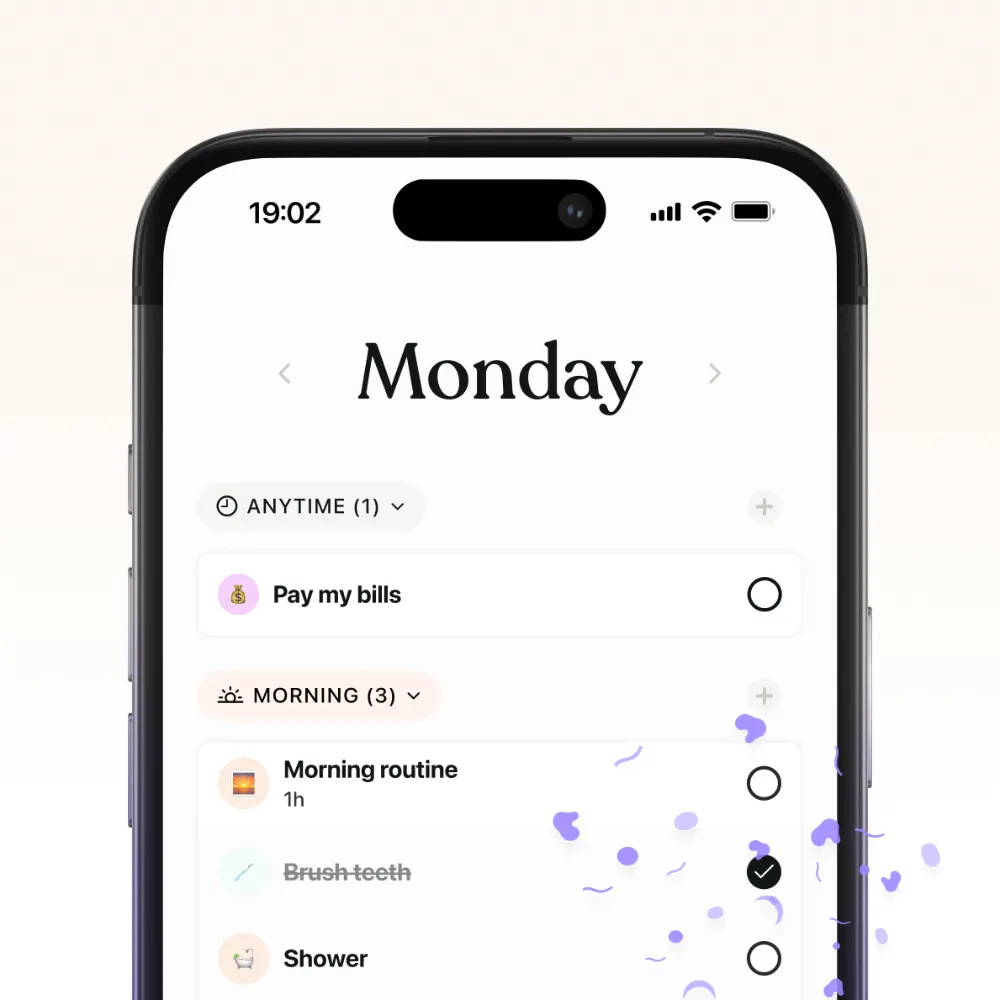
Tiimo: Best for visual daily planning
Tiimo is the kind of planner I’d look at if what you need most is a visual representation of your day and active guidance from an app.
That is fundamentally different from what I built ADHD Bright to do. If your biggest issue is needing your schedule to get your attention throughout the day, I’d look at this category before choosing a Notion template.
Structured: Best for seeing your day as a timeline
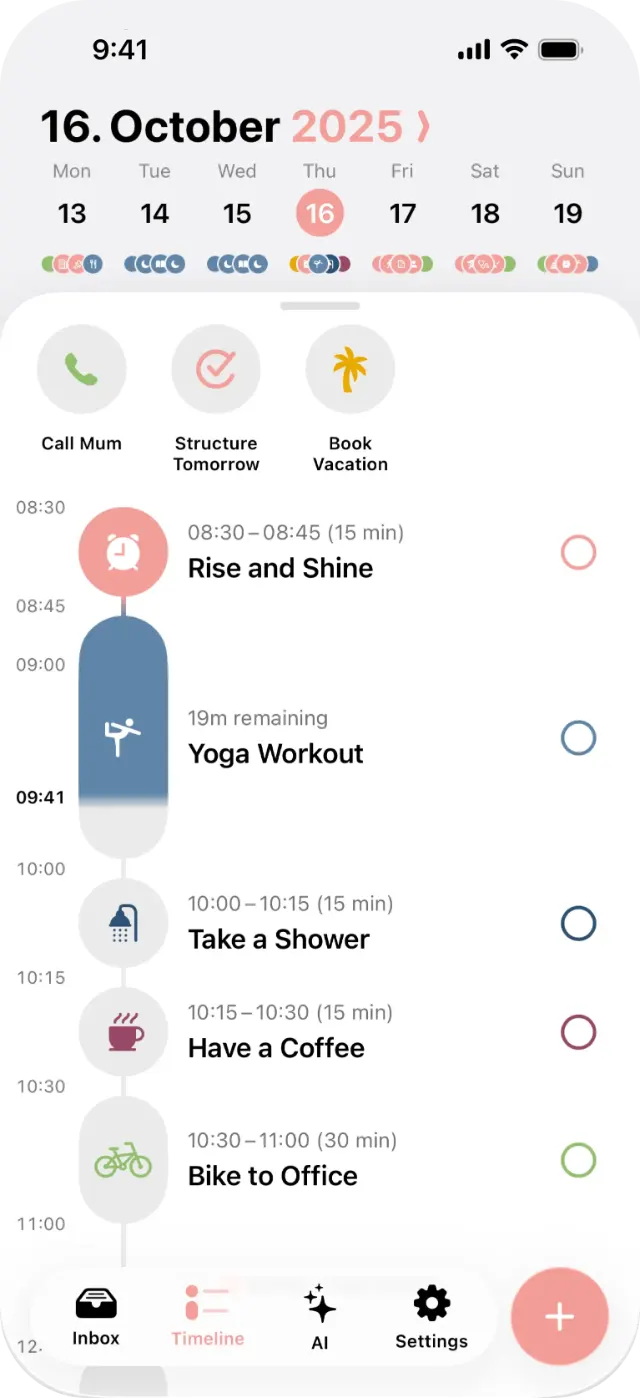
Structured takes a timeline-focused approach, combining tasks with the actual structure of your day.
I like the logic behind this because a to-do list can very easily become a fantasy document. Writing 17 things down doesn’t magically create enough hours to do 17 things.
Actually placing tasks into time forces you to confront how much can realistically fit into your day.
If that is something you struggle with, my guide to ADHD time management and time blindness goes much deeper into the problem.
🧠 Best Notion Digital Planners for ADHD
ADHD Bright: For people who want a Notion planner actually designed around an ADHD brain
Before building ADHD Bright, I tried a lot of ADHD Notion planners too.
And I kept running into the same problem: just because a planner is labelled “ADHD-friendly” doesn’t mean using it actually feels easy when you have ADHD.
Some had so much going on that I didn’t know where to look. Others required too many steps to do something simple. Sometimes the way information was organized simply didn’t make logical sense to me.
Instead of reducing the mental effort required to plan my day, the planner itself became another source of frustration.
That experience fundamentally shaped how I built ADHD Bright.
That is why reducing friction became one of the fundamental principles behind ADHD Bright.
Adding a task needs to be easy. Finding your tasks needs to be easy. Deciding what deserves your attention needs to be easier. And when you’re trying to work, the planner shouldn’t keep presenting you with every project, goal, habit, and unfinished task in your life at the same time.
The psychology and neuroscience aren't decoration. They shaped the system.
I built ADHD Bright around principles from neuroscience and behavioral psychology that could be translated into practical design decisions.
One of those principles is externalizing working memory. Instead of relying on yourself to keep remembering tasks, ideas, appointments, and unfinished things, you put them somewhere reliable. ADHD Bright's design specifically uses this idea of cognitive offloading so the planner carries information instead of requiring you to continually hold it in your head.
Another is reducing decision fatigue.
I don't want to make six decisions just to add a task. I don't want to decide which of seven dashboards I'm supposed to look at. And I definitely don't want to see everything I could possibly be doing every time I sit down to work.
The system also uses ideas such as breaking larger goals into smaller actionable steps, making progress visible, and creating more immediate feedback and rewards rather than expecting distant goals to remain motivating on their own. These principles are part of the underlying design rather than features added afterwards.
Task Manager + Focus Zone
The Task Manager and Focus Zone are probably the clearest examples of that philosophy.
I wanted one place where I could quickly capture tasks without turning task entry into another task.
Then, when it’s time to work, I don’t want to stare at my entire life.
The Focus Zone narrows what I’m looking at so I can concentrate on what actually matters now.
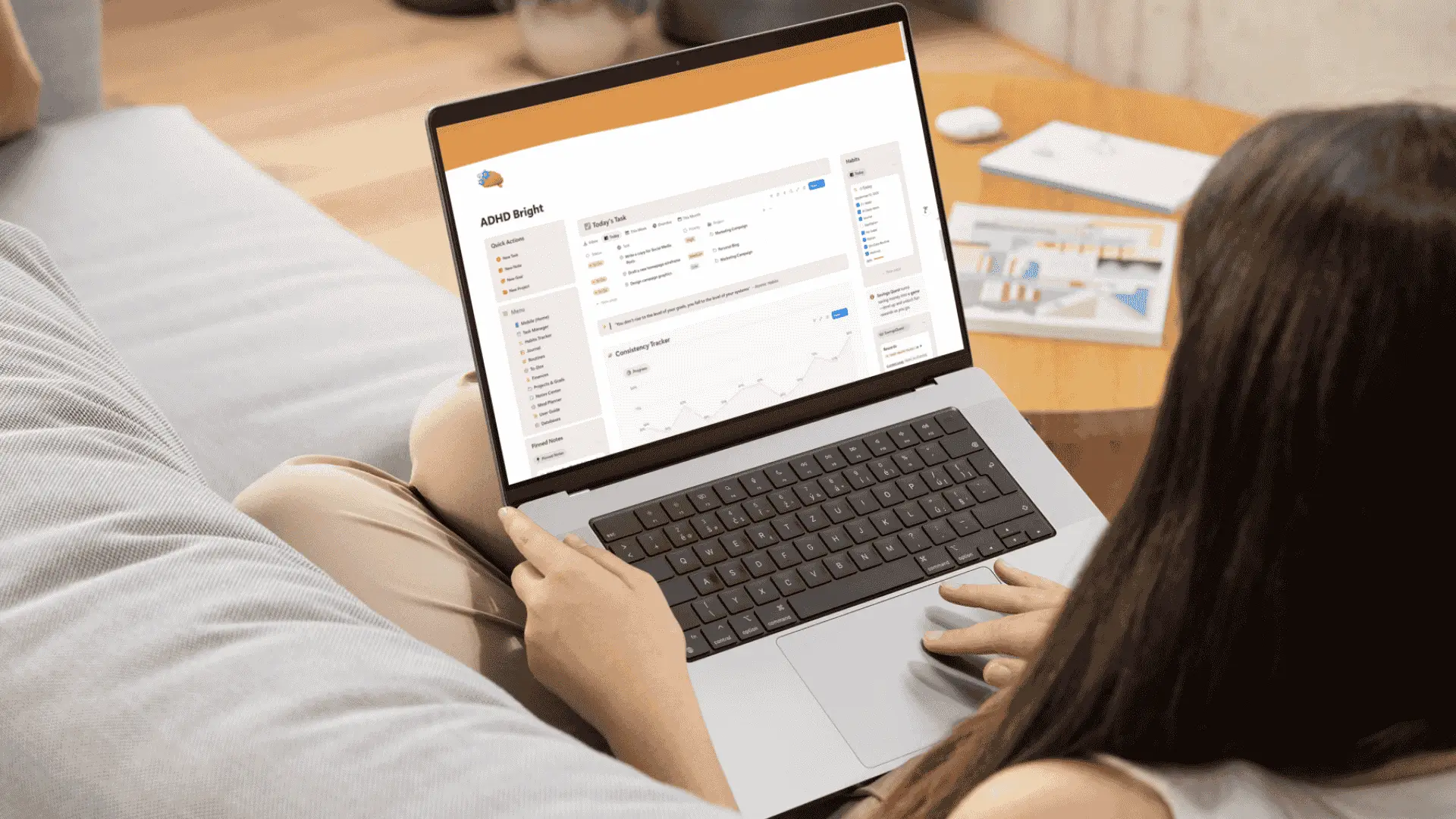
I also use time estimates because simply writing down what I need to do tells me nothing about whether I can realistically do it all. If you struggle with that too, I explain my approach in How to Estimate Time With ADHD and my guide to ADHD-friendly timeboxing.
The weekly planning system gives me different ways of looking at those tasks rather than forcing everything into one view. You can see how I use it in my visual ADHD weekly planner walkthrough.
More than a Task Manager
ADHD Bright includes the Task Manager, Habit Tracker, Routines, Journal, Notes, and Projects & Goals. The Complete version expands the system with the Finance Manager and Meal Planner.
But the point isn't simply that there are lots of tools.
The point is that they were designed as one system, around the same underlying principles, rather than as a collection of dashboards you have to figure out yourself.
That’s why I think of ADHD Bright as a Second Brain rather than simply a digital planner.
I don’t want my brain spending energy remembering where I put something, holding onto tasks so I don’t forget them, or repeatedly deciding what I should be doing next.
I want the system to carry as much of that load as possible.
A free Notion ADHD template: Best if you want to experiment first
Before paying for a Notion planner, there’s nothing wrong with experimenting with a free template.
In fact, if you’ve never used Notion before, I’d encourage it.
You’ll quickly discover whether you like the database-style approach or whether opening Notion makes you want to throw your laptop through a window.
The biggest danger is customization. You can change almost everything, which doesn’t mean you should.
If you find yourself spending six hours choosing icons and building the world’s most sophisticated dashboard while the task you originally opened Notion to do remains untouched, customization has become another distraction.
✍️ Best Tablet Digital Planners for ADHD
Future ADHD: Best for people who still want the traditional planner experience
Future ADHD sits in the tablet-planner category rather than the app or Notion category.
That matters because the experience is much closer to using a traditional planner digitally. If the ritual of sitting down and writing is part of what makes planning work for you, this type of planner makes much more sense than a database-heavy Notion system.
An undated Goodnotes planner: Best for digital handwriting
You don’t necessarily need something with “ADHD” printed across the front.
A clean, undated Goodnotes planner may be a better fit if handwriting is what makes you slow down and think.
I’d specifically choose undated.
If you abandon it for three weeks, there isn’t a graveyard of blank pages waiting to remind you that you disappeared. You open it and continue.
That ability to restart matters far more to me than having another 30 productivity features.
What About Free Digital Planners?
Free can absolutely be enough.
If you’re still trying to figure out what your brain actually likes, I wouldn’t immediately spend money on an elaborate system.
Test the format first. Try a free Notion template. Try the free version of an app you’re considering. Try a basic PDF planner.
If the answer keeps being yes, then it’s worth deciding whether you need a more complete system.
Why I Eventually Built ADHD Bright in Notion
After trying so many different approaches, I realized I didn’t need another planner telling me to be more organized.
And I didn’t simply need Notion. I'd already tried Notion planners.
What I needed was a system that made logical sense to me and removed as many unnecessary steps and decisions as possible.
I wanted somewhere I could put things quickly without thinking about where they belonged for five minutes. I wanted to open my planner and understand what needed my attention. I wanted tasks, habits, routines, projects, notes, and reflection to work together rather than feeling like separate mini-apps.
Most importantly, I wanted the system itself to reflect what I'd learned about ADHD, motivation, working memory, decision-making, and behavior.
That's why the neuroscience and psychology behind ADHD Bright became design principles rather than marketing claims.
Notion gave me the flexibility to build that system, but Notion itself isn't what makes ADHD Bright ADHD-friendly.
The design does.
That distinction matters because I've used ADHD Notion planners that created exactly the kind of friction I was trying to escape.
ADHD Bright now combines the Task Manager, Habit Tracker, Routines, Journal, Notes, and Projects & Goals in one connected system. The Complete version adds the Finance Manager and Meal Planner.
But I still don't think it's the right planner for everyone.
How to Actually Stick With Your Digital Planner
Finding the planner is only half of the problem.
You then have to use the bloody thing.
My biggest advice is: don’t start by using everything.
If your new planner contains tasks, habits, journaling, goals, routines, projects, and 14 other exciting things, you don’t need to set them all up tonight.
- 1Start with the place where you capture things and the place where you see what you’re doing today.
- 2Once opening the planner starts becoming normal, add more.
- 3Do a weekly reset. Otherwise small bits of disorder eventually accumulate until I don’t want to look at the system anymore. For larger projects, I use that review to see what’s moving, what I’ve underestimated, and what the next actual step is. I explain that process further in my guide to ADHD project planning.
Most importantly, expect yourself to disappear occasionally.
The objective isn’t a perfect 365-day streak.
It’s having a system you can reopen without needing a three-hour cleanup operation first.
I have two guides specifically for this part. How to Use a Planner With ADHD covers the practical day-to-day system, while How to Finally Stick With Your ADHD Planner focuses on consistency and restarting.
So, What’s the Best Digital Planner for ADHD?
I don’t think there is one.
There is a best type for you.
And pay attention to what happens around the planner.
A planner app can have every ADHD feature imaginable, but if opening it sends you into a 40-minute phone rabbit hole, those features don’t matter.
A Notion template can be incredibly powerful, but if the system is confusing or you spend all your time customizing it, that isn’t helping either.
A beautiful iPad planner isn’t useful if your Apple Pencil is permanently sitting uncharged in a drawer.
The best digital planner for ADHD adults isn’t the one that promises to change you.
It’s the one that creates the least friction between remembering what matters and actually doing it.
If you want to compare digital planners with paper planners and other formats too, my broader guide to the best ADHD planners for adults covers those options together.
Frequently Asked Questions
+What type of planner is best for ADHD?
There isn’t one format that works best for everyone. Planner apps are useful when you need active reminders and daily guidance. Notion planners are better suited to people who want several areas of their life connected in one system. Tablet planners work particularly well for people who prefer handwriting.
If you’re unsure which characteristics matter most to you, start with How to Choose the Best Planner for ADHD.
+What is the best planning app for people with ADHD?
If you specifically want an app rather than a Notion or tablet planner, visual planning tools such as Tiimo and Structured are worth comparing. The better choice depends on what kind of planning experience you want and whether having your planner on your phone helps or distracts you.
+What is the best organizer for someone with ADHD?
Look for something that reduces the amount you need to remember and decide for yourself. Fast capture, clear priorities, simple navigation, and easy restarting matter more than having an enormous feature list.
+What is an ADHD digital planner?
An ADHD digital planner is a planning system used on a phone, tablet, or computer for organizing tasks, schedules, routines, projects, and other information. It can take the form of a dedicated app, a system built in a platform such as Notion, or a digital tablet planner.
+Can I use Notion as an ADHD planner?
Yes. Notion can be used for everything from a simple task list to an interconnected planning system containing tasks, habits, routines, projects, notes, goals, and other information.
But using Notion alone doesn't make a planner ADHD-friendly. How the system is structured and how much friction it creates matters. You can build your own workspace, use a free template, or choose a pre-built system such as ADHD Bright.
+Is a digital planner better than paper for ADHD?
Not automatically. Digital systems offer advantages such as access across devices, search, automation, and dynamic organization, while paper removes many digital distractions and provides the physical experience of handwriting.
I compare those trade-offs in detail in Digital vs Paper ADHD Planners: What Works Best?.
+Are free digital planners good enough?
Absolutely, if they do what you need.
Free options are particularly useful for testing whether you actually enjoy a particular planning format before paying for a more comprehensive system. A planner you consistently use is more valuable than a sophisticated one you abandon.